Connect your Substack
Connecting your Substack account is required to publish and sync notes. This is done during onboarding when you first sign up.
During onboarding
When you create a StackSweller account, you’ll be guided through connecting your Substack publication. You’ll need:
- Your Substack publication URL (e.g.
yourname.substack.com) - Your Substack credentials or session cookie
Settings
Your account settings are available at Settings (bottom of the sidebar).
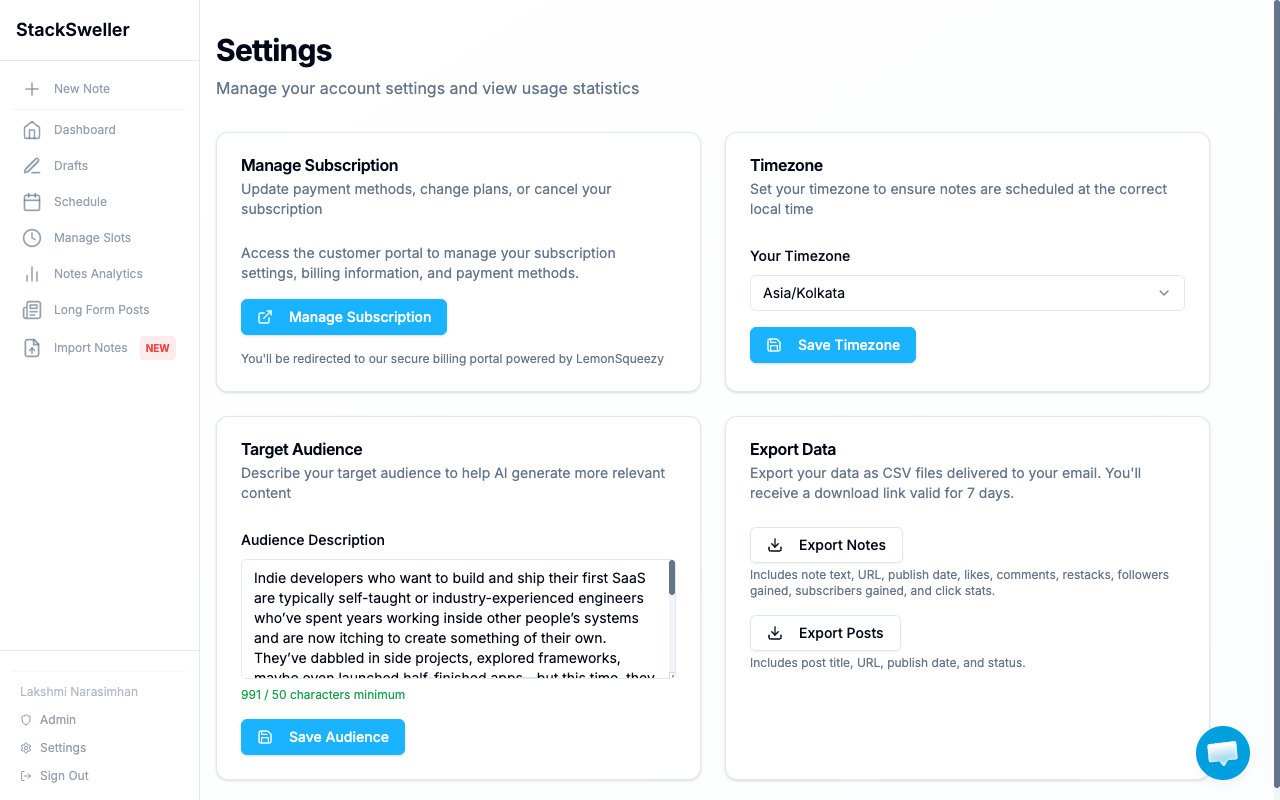
The Settings page includes:
| Section | What it does |
|---|---|
| Manage Subscription | Upgrade, downgrade, or cancel via the billing portal |
| Timezone | Set your local timezone for accurate scheduling |
| Target Audience | Describe your audience to improve AI-generated content |
| Export Data | Download your notes and posts as CSV |
Set your timezone
- Go to Settings
- Find the Timezone section
- Select your timezone from the dropdown
- Click Save Timezone
⚠️ Warning
Set your timezone before creating scheduling slots. Slot times are always interpreted in your configured timezone.
Target audience description
The audience description is sent to Claude with every AI generation request. The more specific it is, the better the AI output matches your writing style and audience expectations.
Example:
“Tech-savvy entrepreneurs and startup founders interested in AI, productivity tools, and building SaaS products. They value practical advice and actionable insights.”